
Moving money in and out of 666W Game is straightforward.
This guide walks you through every step from adding your first RS 100 to cashing out your winnings directly to JazzCash or Easypaisa.
Depositing Money
Before You Deposit
Keep these points in mind before adding funds:
- Minimum deposit is RS 100 only
- Use only your own JazzCash or Easypaisa account
- Always deposit through the App never through third-party links
- Platform charges zero fees on all deposits
Supported Deposit Methods
| Method | Speed | Minimum |
| JazzCash | Instant | RS 100 |
| Easypaisa | Instant | RS 100 |
| Bank Transfer | Same day | RS 100 |
| Crypto | Fast | Varies |
How to Deposit in 666 W Game APK
Log In Open W666 Game and sign into your account.
Go to Wallet Tap the Wallet icon on your home screen or dashboard.
Tap Recharge Select the Recharge or Deposit option inside the wallet section.
Pick Your Method Choose JazzCash, Easypaisa, Bank Transfer, or Crypto.
Enter Amount Type the PKR amount you want to deposit. Start small if it is your first time.
Note the Account Number The app shows a unique recipient number. Write it down or screenshot it carefully.
Transfer From Your Wallet Open JazzCash or Easypaisa separately and send the exact amount to the number from Step 6.
Confirm Inside the App Return to Game and tap I Have Paid or Confirm. Your balance updates within seconds.
Withdrawing Money from 666W Game
Before You Withdraw
- Minimum withdrawal is RS 150
- Maximum withdrawal is RS 50,000 per session
- Your JazzCash or Easypaisa account must be linked first
- First-time withdrawal may need identity verification
- Zero wager requirement — no rollover needed
Supported Withdrawal Methods
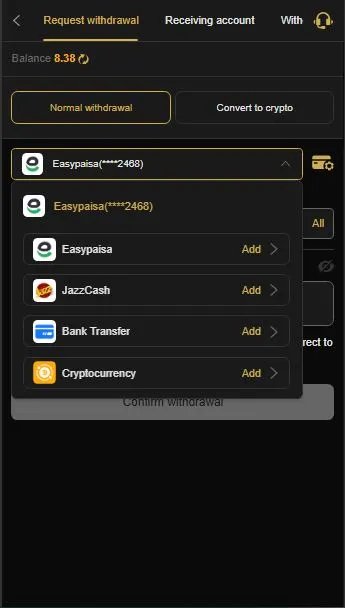
| Method | Speed | Minimum |
| JazzCash | Within 30 mins | RS 150 |
| Easypaisa | Within 30 mins | RS 150 |
| Bank Transfer | A few hours | RS 150 |
How to Withdraw in 666W Game APP
Log In Open the app and sign into your 666W Game APK account.
Go to Wallet Tap Wallet on your dashboard.
Tap Withdraw Select the Withdraw or Cash Out option.
Link Your Account (First Time Only) Add your JazzCash number, Easypaisa number, or bank details. This is a one-time setup.
Enter Withdrawal Amount Type the exact amount you want to cash out — between RS 150 and RS 50,000.
Select Receiving Account Choose which linked account should receive your funds.
Enter Security Password Type your transaction password if the app asks for one.
Submit Request Tap Confirm and wait. Funds arrive in your JazzCash or Easypaisa within 30 minutes.
Need Support?
The 666W APK DOWNLOAD support team is available 24/7 for any deposit or withdrawal issue.
- In-App Live Chat: fastest response, available inside the App
- WhatsApp Support: direct one-on-one help
- Telegram Channel: announcements and agent support
If you have any issue then do not hesitate to Contact us